China · Mapas e apps

Google Maps na China: o que usar no lugar.
Escolha seu mapa, salve seu hotel e chegue com uma rota confiável. Ter internet é apenas parte da resposta.
Escolha seu mapa Zbigniew Kubinski
O pior momento para descobrir essa diferença é ao chegar ao aeroporto. O mapa pode aparecer na tela e falhar justamente na próxima etapa importante: encontrar o hotel pelo nome local, localizar a entrada certa, carregar uma rota de transporte público em tempo real ou fazer o motorista esperar no lado correto de uma avenida com seis faixas.
Por isso, a pergunta útil não é apenas “O Google Maps abre?”. É “Qual configuração vai me levar do aeroporto até a porta certa?”
Este guia foi verificado em 24 de agosto de 2026 com medições ao vivo das redes da China continental, documentação atual do Google e da Apple, orientações do governo chinês para viajantes, a versão internacional mais recente do Amap, a arquitetura de roaming da GSMA e uma análise acadêmica revisada por pares sobre os sistemas de coordenadas usados na China.
O Google Maps funciona na China continental?
Em uma conexão comum da China continental, a resposta confiável é não.
As medições ao vivo da GreatFire registraram maps.google.com como bloqueado nos dois testes conclusivos realizados na China continental durante os 90 dias anteriores. O mais recente ocorreu em 13 de agosto de 2026. O último teste do servidor da API do Maps, em 18 de agosto, encontrou acesso prejudicado. Diferentes serviços do Google podem se comportar de formas distintas, mas é justamente por isso que o viajante deve tratar o Google Maps como pouco confiável, em vez de torcer para que uma solicitação específica consiga passar.
O tipo de conexão muda a resposta:
| Conexão na China continental | Dá para confiar no Google Maps? | O que realmente importa |
|---|---|---|
| Wi-Fi de hotel, aeroporto, cafeteria ou outra rede local | Não | Usa uma conexão da China continental e está sujeito ao bloqueio local. |
| SIM de uma operadora chinesa | Não | Os dados móveis locais comuns estão sujeitos às mesmas restrições. |
| Roaming internacional da sua operadora habitual | Talvez | Algumas operadoras enviam os dados pela rede de origem ou por um gateway internacional; outras usam rotas diferentes. Consulte sua operadora. |
| eSIM de viagem que confirme expressamente o roteamento internacional na China | Geralmente sim, enquanto você usa os dados móveis dele | O que importa é o roteamento do plano, não a palavra “eSIM”. Ao voltar para o Wi-Fi local, a conexão também muda. |
| VPN sobre uma conexão local | Possivelmente, mas não como solução padrão confiável | Confiabilidade e risco jurídico são questões diferentes. Orientações oficiais de viagem vigentes alertam para possíveis penalidades em alguns casos. |
| Mapa do Google baixado anteriormente | Apenas como recurso limitado | A disponibilidade varia, e o modo offline não oferece rotas a pé, de transporte público ou de bicicleta, nem trânsito ao vivo ou trajetos alternativos. |
Wi-Fi de hotel, aeroporto, cafeteria ou outra rede local
- Dá para confiar no Google Maps?
- Não
- O que realmente importa
- Usa uma conexão da China continental e está sujeito ao bloqueio local.
SIM de uma operadora chinesa
- Dá para confiar no Google Maps?
- Não
- O que realmente importa
- Os dados móveis locais comuns estão sujeitos às mesmas restrições.
Roaming internacional da sua operadora habitual
- Dá para confiar no Google Maps?
- Talvez
- O que realmente importa
- Algumas operadoras enviam os dados pela rede de origem ou por um gateway internacional; outras usam rotas diferentes. Consulte sua operadora.
eSIM de viagem que confirme expressamente o roteamento internacional na China
- Dá para confiar no Google Maps?
- Geralmente sim, enquanto você usa os dados móveis dele
- O que realmente importa
- O que importa é o roteamento do plano, não a palavra “eSIM”. Ao voltar para o Wi-Fi local, a conexão também muda.
VPN sobre uma conexão local
- Dá para confiar no Google Maps?
- Possivelmente, mas não como solução padrão confiável
- O que realmente importa
- Confiabilidade e risco jurídico são questões diferentes. Orientações oficiais de viagem vigentes alertam para possíveis penalidades em alguns casos.
Mapa do Google baixado anteriormente
- Dá para confiar no Google Maps?
- Apenas como recurso limitado
- O que realmente importa
- A disponibilidade varia, e o modo offline não oferece rotas a pé, de transporte público ou de bicicleta, nem trânsito ao vivo ou trajetos alternativos.
Este artigo trata da China continental. Hong Kong e Macau têm sistemas de internet diferentes, e seu plano móvel pode considerá-los destinos separados.
O mapa carregar não significa que ele funcione bem
Um eSIM com roteamento internacional pode resolver o problema de acesso à rede. Isso não transforma automaticamente o Google Maps no melhor aplicativo para circular pelo país.
Para ser útil em um trajeto real, um mapa precisa passar por quatro testes:
- Acesso: o aplicativo, a busca e as rotas precisam alcançar os servidores.
- Dados locais de lugares: o hotel, restaurante, estação ou atração precisa ter uma ficha atual e um nome que você consiga encontrar.
- Precisão nos últimos 500 metros: a rota deve terminar na entrada utilizável ou no ponto de embarque, não simplesmente em algum lugar dentro de um quarteirão enorme.
- Contexto de transporte ao vivo: trânsito, restrições temporárias, saídas de estações, linhas de ônibus e áreas de embarque precisam refletir as condições locais.
A documentação do próprio Google traz uma correção importante à resposta comum dos blogs de viagem. A tabela atual de cobertura do Maps Platform classifica como boa a cobertura da China para mapas 2D, geocodificação (transformar um endereço em coordenadas), rotas de carro e rotas a pé. Os dados de trânsito são aproximados, e não há cobertura para trajetos de bicicleta ou limites de velocidade.
Isso não comprova que o aplicativo Google Maps para consumidores funcione na China. O Google deixa claro que a tabela se refere às APIs e aos SDKs para desenvolvedores, não à disponibilidade de recursos no aplicativo. Ela mostra, porém, por que a afirmação de que “todo o mapa da China do Google está desatualizado há anos” é simplista demais.
A conclusão mais defensável é esta: o Google tem dados cartográficos relevantes, mas o serviço sofre restrições de rede e suas informações sobre trajetos locais não são a melhor fonte para usar sozinha. Amap, Apple Maps e DiDi oferecem ferramentas mais fortes para navegação e embarque.
O que é, de fato, o deslocamento do GPS na China?
Muitos guias dizem que a China “embaralha o GPS” ou desloca todas as localizações do Google Maps por uma distância fixa. É uma explicação fácil de lembrar, mas tecnicamente imprecisa.
As posições do GPS normalmente usam um sistema global de coordenadas chamado WGS-84. Os mapas digitais públicos da China continental costumam usar um sistema transformado chamado GCJ-02. A própria documentação para desenvolvedores do Amap confirma que seus mapas usam GCJ-02, e não coordenadas WGS-84 sem transformação.
Um estudo cartográfico revisado por pares explica o problema prático: quando um ponto WGS-84 é colocado diretamente sobre um mapa GCJ-02, ou o contrário, o marcador pode aparecer a dezenas ou centenas de metros da rua correspondente. Um desencontro parecido pode surgir quando a camada de ruas e as imagens de satélite usam referências de coordenadas diferentes.
Duas ressalvas são importantes:
- Isso não quer dizer que o ponto azul do Google Maps sempre ficará deslocado pela mesma distância. O comportamento pode variar conforme a camada, a versão do aplicativo, a fonte dos dados e o lugar onde a conversão acontece.
- Aplicativos de mapas locais licenciados fazem a conversão exigida como parte do serviço normal na China. Por isso, Amap e Apple Maps são escolhas mais seguras mesmo quando o Google Maps está acessível.
Para o viajante, o nome técnico importa menos que a regra prática: não trate um pin do Google, uma imagem de satélite e um mapa de ruas local como se todos usassem o mesmo sistema. Confirme o destino pela ficha local e pelo endereço em chinês.
Os melhores aplicativos de mapas para a China em 2026
Não existe um único vencedor para todas as tarefas. A melhor configuração combina um aplicativo para navegar e outro para encontrar o ponto certo de embarque.
| Aplicativo | Melhor para | Idioma e plataforma | Limitação que você precisa prever |
|---|---|---|---|
| Apple Maps | A opção cotidiana mais simples para quem usa iPhone | Interface em português no iPhone | Não existe para Android; a quantidade de informações locais ainda varia conforme o lugar |
| Amap Global (Gaode) | Lugares locais, caminhadas, carro, bicicleta, transporte público, trânsito e navegação no Android | iPhone e Android; multilíngue | Algumas fichas ou telas detalhadas ainda são mais fáceis com um endereço em chinês |
| DiDi | Levar um carro ao ponto de embarque correto | Interface em inglês no iPhone e Android | Resolve a corrida, não todo o trajeto a pé ou turístico |
| Baidu Maps | Busca local detalhada para quem se sente à vontade com o chinês | iPhone e Android; experiência centrada no chinês | Barreira de idioma maior e uma interface que exige aprendizado |
| Google Maps | Lugares conhecidos já salvos e uma segunda referência de orientação | iPhone e Android, quando a rede consegue acessá-lo | Bloqueado em conexões locais e mais fraco como única fonte de detalhes sobre trajetos locais |
Apple Maps
- Melhor para
- A opção cotidiana mais simples para quem usa iPhone
- Idioma e plataforma
- Interface em português no iPhone
- Limitação que você precisa prever
- Não existe para Android; a quantidade de informações locais ainda varia conforme o lugar
Amap Global (Gaode)
- Melhor para
- Lugares locais, caminhadas, carro, bicicleta, transporte público, trânsito e navegação no Android
- Idioma e plataforma
- iPhone e Android; multilíngue
- Limitação que você precisa prever
- Algumas fichas ou telas detalhadas ainda são mais fáceis com um endereço em chinês
DiDi
- Melhor para
- Levar um carro ao ponto de embarque correto
- Idioma e plataforma
- Interface em inglês no iPhone e Android
- Limitação que você precisa prever
- Resolve a corrida, não todo o trajeto a pé ou turístico
Baidu Maps
- Melhor para
- Busca local detalhada para quem se sente à vontade com o chinês
- Idioma e plataforma
- iPhone e Android; experiência centrada no chinês
- Limitação que você precisa prever
- Barreira de idioma maior e uma interface que exige aprendizado
Google Maps
- Melhor para
- Lugares conhecidos já salvos e uma segunda referência de orientação
- Idioma e plataforma
- iPhone e Android, quando a rede consegue acessá-lo
- Limitação que você precisa prever
- Bloqueado em conexões locais e mais fraco como única fonte de detalhes sobre trajetos locais
Apple Maps: a opção mais simples no iPhone
Para a maioria dos donos de iPhone, o Apple Maps é o ponto de partida mais fácil. A página de disponibilidade de recursos do iOS 26 inclui a China continental para navegação curva a curva, transporte público e trajetos de bicicleta. A interface permanece no idioma habitual do aparelho.
A Apple também informa que as rotas exigem conexão com a internet e Localização Precisa. Ou seja, o Apple Maps evita o problema de acesso do Google, mas ainda precisa de dados móveis. Guarde o nome e o endereço do destino em chinês para os casos em que a busca em português não encontrar a ficha correta.
Use para: deslocamentos cotidianos a pé, de transporte público ou de carro quando você quiser uma interface conhecida.
Amap Global: o mapa local mais completo, principalmente no Android
O Amap também é chamado de Gaode Maps. É a opção mais forte para quem busca um mapa diretamente ligado às estradas, aos lugares, ao trânsito e ao transporte atuais da China.
O antigo conselho de que o Amap só existe em chinês está desatualizado. Em julho de 2025, o portal oficial de Xangai em inglês informou que o Amap havia adicionado inglês e outros 14 idiomas, além de navegação de carro, a pé, de bicicleta e por transporte público, com uma interface de chamada de carros em inglês.
O produto mudou novamente em 2026. Uma atualização de julho adicionou serviços para viajantes internacionais com orientação na chegada ao aeroporto, rotas para o hotel, planejamento de táxi e transporte público, cartões bilíngues de frases, recomendações próximas e informações de emergência. A ficha oficial no Google Play recebeu outra atualização em 17 de agosto de 2026.
Isso não significa que o nome de todo pequeno estabelecimento ou cada tela secundária tenha uma tradução perfeita. Salve com antecedência o hotel e os destinos importantes, de preferência também com os nomes em chinês.
Use para: a navegação local mais completa no Android e como uma alternativa poderosa no iPhone.
DiDi: o melhor aplicativo para o ponto de embarque
Um mapa comum pode levar você até um prédio, enquanto um aplicativo de transporte precisa colocar o motorista em um ponto de embarque permitido junto à calçada. São duas tarefas diferentes.
O guia oficial da China para residentes estrangeiros informa que o aplicativo DiDi Greater China aceita números de telefone estrangeiros e cartões de crédito internacionais. O guia oficial de Pequim sobre o DiDi documenta uma interface em inglês e mensagens rápidas traduzidas entre inglês e chinês.
Use o DiDi quando precisar de um carro e confira o marcador de embarque antes de confirmar. Em aeroportos e estações de trem, siga as placas até a área reservada para carros de aplicativo, em vez de presumir que o ponto azul fica em uma faixa onde o embarque é permitido.
Use para: traslados do aeroporto, embarques no hotel e qualquer trajeto em que a comunicação com o motorista seja importante.
Baidu Maps: poderoso, mas não é a opção inicial mais fácil
O Baidu Maps é uma grande plataforma local com informações detalhadas sobre lugares e navegação. Pode ser uma excelente segunda fonte para quem lê chinês ou aceita traduzir a interface.
Em uma primeira viagem curta, o Amap Global é hoje a recomendação mais simples no Android porque sua experiência internacional é explícita e atual. Se a viagem for concentrada em Pequim, a cidade também oferece um mapa específico de Pequim em inglês com rotas a pé, de bicicleta, de transporte público e de carro, além de muitos pontos de interesse locais.
Use para: pesquisas locais detalhadas quando o idioma não for um obstáculo ou para consultar o serviço específico de Pequim em inglês.
A configuração que eu usaria
Se você tem um iPhone
- Mantenha o Apple Maps como principal aplicativo de navegação.
- Instale o Amap Global para buscas locais mais completas e uma segunda opção de rota.
- Instale e cadastre o DiDi para as corridas.
- Use um eSIM para a China com roteamento internacional se também precisar de Google, Gmail, WhatsApp ou outros serviços bloqueados.
- Guarde nas notas da reserva o nome, o endereço e o telefone de cada hotel em chinês, além da entrada mais próxima.
Se você tem um celular Android
- Instale o Amap Global como mapa principal antes da viagem.
- Instale e cadastre o DiDi para as corridas.
- Mantenha o Google Maps apenas como referência secundária ao usar dados internacionais confirmados.
- Salve endereços e capturas de tela importantes fora dos aplicativos do Google.
- Termine todas as instalações antes do voo. O Google Play ainda estava bloqueado no teste da GreatFire realizado na China continental em 23 de agosto de 2026.
A melhor configuração não é “Google ou aplicativos chineses”. É um mapa local para o trajeto, um aplicativo de transporte para chegar à calçada certa e dados com roteamento internacional para os serviços globais que você ainda precisa usar.
Checklist de 10 minutos antes do voo
Faça isso enquanto ainda for fácil acessar sua loja de aplicativos, seu e-mail e seu serviço móvel habitual:
- Instale as atualizações do Apple Maps, o Amap Global e o DiDi. Abra cada aplicativo pelo menos uma vez.
- Cadastre-se nos serviços que exigem número de telefone. Não deixe a verificação para o Wi-Fi do aeroporto.
- Salve seu primeiro hotel em português e em chinês. Inclua o endereço, o telefone e uma captura da reserva.
- Salve o terminal exato do aeroporto ou da estação. “Aeroporto de Pequim” ou “estação de Xangai” não é específico o bastante.
- Confira a entrada final. Grandes estações, shoppings, complexos e atrações podem ter vários portões distantes entre si.
- Instale seu eSIM para a China. Siga as instruções do provedor sobre o momento da ativação, em vez de presumir que todos os planos começam da mesma forma.
- Escolha o eSIM de viagem como linha de dados móveis. Desative a troca automática de dados para evitar roaming acidental com sua operadora habitual.
- Mantenha ao menos um recurso fora dos aplicativos de mapas. Uma captura de tela e um cartão com o endereço em chinês continuam úteis quando uma conta, um servidor ou o sinal falha.
No primeiro traslado do aeroporto, mostre ao motorista o nome e o endereço do hotel em chinês mesmo que o DiDi já tenha carregado o destino. Compartilhar o mesmo destino no idioma local é uma confirmação mais forte que duas pessoas confiando em nomes diferentes no mapa.
Um eSIM de viagem fará o Google Maps funcionar?
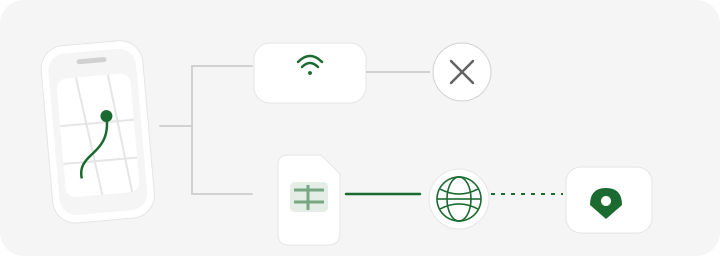
- Wi-Fi local ou SIM da China continental
- O tráfego usa uma conexão continental. Os serviços do Google podem estar bloqueados.
- Dados em roaming com roteamento internacional
- Uma saída no exterior pode permitir o acesso ao Google. Confira o plano específico; a precisão do mapa é uma questão separada.
- Sua alternativa na chegada
- Prepare Apple Maps ou Amap e guarde o endereço do hotel em chinês.
Pode fazer, mas somente se o plano usar o roteamento de rede correto.
Um eSIM é apenas um perfil SIM digital. Ele não contorna nenhuma restrição por natureza. O recurso relevante é o roaming de dados com roteamento internacional.
A GSMA descreve uma arquitetura de roaming com roteamento pela rede de origem, na qual o tráfego do usuário é enviado de volta pela sua rede habitual. De forma parecida, um eSIM de viagem para a China pode se conectar à antena de uma operadora local e enviar o tráfego de internet por um gateway fora da China continental. Nessa configuração, os serviços bloqueados do Google podem ficar acessíveis pelos dados móveis do eSIM.
Três regras evitam surpresas desagradáveis:
- Confirme o roteamento do provedor na China. Não presuma que todo eSIM para a China funciona dessa forma.
- Observe a troca para o Wi-Fi. O Wi-Fi do hotel, aeroporto ou café usa sua própria conexão local. Se o Google parar de carregar, confira se o celular entrou no Wi-Fi automaticamente.
- Separe acesso de qualidade de navegação. Uma conexão funcional com o Google não substitui Amap, Apple Maps ou DiDi para detalhes locais.
O eSIM do Guac para a China é configurado para que Google Maps, Gmail, WhatsApp e outros serviços bloqueados funcionem pelos dados móveis do Guac sem uma VPN separada. Essa vantagem se aplica à conexão de dados do Guac, não ao Wi-Fi do hotel. Você pode comparar os planos do Guac para a China antes da viagem.
Se a China for apenas uma parada em um roteiro maior, confirme também se o plano inclui Hong Kong ou Macau. Cobertura na China continental não significa automaticamente que os três destinos estão incluídos.
Por que os mapas offline do Google não são a solução
“Baixe antes do voo” parece um conselho sensato, mas os mapas offline do Google têm dois problemas neste caso.
Primeiro, o Google informa que os downloads offline não estão disponíveis em alguns países ou regiões. Teste a área específica da cidade em seu próprio celular antes de tratá-la como recurso.
Segundo, mesmo quando o download funciona, ele não inclui rotas de transporte público, a pé ou de bicicleta. As rotas de carro offline também perdem o trânsito em tempo real e os trajetos alternativos. São justamente os recursos que muitos viajantes independentes precisam em uma cidade chinesa.
Use um mapa baixado se ele funcionar, mas combine com algo menos frágil:
- o nome e o endereço do hotel em chinês;
- uma captura da reserva e da entrada;
- o telefone local;
- a estação de metrô e a saída mais próximas;
- um cartão de endereço bilíngue, impresso ou salvo, para mostrar a outra pessoa.
A preparação offline deve reduzir a dependência de um aplicativo, não criar outra forma de dependência do Google Maps.
Vale a pena usar uma VPN para o Google Maps na China?
Este artigo não recomenda uma VPN comercial como configuração padrão de navegação.
Uma VPN pode tornar um serviço bloqueado acessível por uma conexão local, mas confiabilidade técnica e legalidade são questões distintas. A orientação atual do Departamento de Estado dos Estados Unidos diz que o uso de VPN é ilegal na maioria dos casos e pode resultar em apreensão do aparelho, multa ou detenção. As recomendações de viagem do Smartraveller, do governo australiano, também alertam que contornar as restrições pode ser ilegal e gerar penalidades.
As regras e a aplicação delas podem mudar, e este artigo não é aconselhamento jurídico. Consulte as orientações oficiais para sua nacionalidade e as normas locais atuais antes de usar qualquer ferramenta de contorno.
Para a navegação comum, há um plano mais simples: use Apple Maps ou Amap para a rota, DiDi para o embarque e um serviço autorizado de roaming ou eSIM com roteamento internacional para os aplicativos globais de que você precisa.
O veredito
O Google Maps não é inútil na China, mas não deixe toda a viagem depender dele.
No Wi-Fi comum da China continental ou com um SIM local, presuma que ele não funcionará de forma confiável. Com um plano para a China que envie expressamente os dados por uma rede internacional, o Google Maps pode ficar acessível e ser útil para consultar lugares salvos ou buscar uma segunda opinião. Mesmo assim, ele não deve ser sua única fonte para encontrar uma entrada atualizada, uma rota de transporte público ou um ponto de embarque.
A configuração mais forte em 2026 é simples:
- iPhone: Apple Maps e Amap Global, com DiDi para as corridas.
- Android: Amap Global e DiDi, com Google Maps como ferramenta secundária opcional por meio de dados internacionais confirmados.
- Todo viajante: salve o endereço em chinês e a entrada correta antes de deixar uma conexão em que você confia.
A China não exige que você abandone os aplicativos que já conhece. Ela exige que você pare de pedir a um único aplicativo que faça todo o trabalho.
Para entender melhor a conectividade, leia nosso guia sobre o Grande Firewall da China e nosso guia prático para usar o WhatsApp na China. Se precisar ligar para um hotel ou uma companhia aérea, consulte também nosso guia sobre como fazer ligações com um eSIM de dados.
Perguntas frequentes
O Google Maps funciona na China em 2026?
O Google Maps é bloqueado ou pouco confiável no Wi-Fi e nos dados móveis locais da China continental, por isso o viajante não deve depender dele. Ele pode ficar acessível pelo roaming da operadora habitual ou por um eSIM de viagem que envie expressamente o tráfego por um gateway internacional. Mesmo assim, Apple Maps ou Amap Global são opções melhores para lugares, transporte público, entradas, trânsito e pontos de embarque atualizados.
Posso usar o Google Maps na China sem VPN?
Sim, se seus dados móveis tiverem roteamento internacional. Alguns planos de roaming e determinados eSIMs de viagem para a China oferecem esse roteamento, incluindo os planos do Guac. O recurso depende do plano, portanto confirme antes da compra. O Google Maps volta a ser bloqueado ou pouco confiável quando você troca esses dados móveis pelo Wi-Fi comum de um hotel, aeroporto ou café da China continental.
Qualquer eSIM para a China faz o Google Maps funcionar?
Não. Um eSIM é apenas um perfil SIM digital. O que importa é por onde o plano envia seu tráfego de internet. Procure uma confirmação expressa de que o plano para a China usa roteamento internacional ou permite acesso aos serviços do Google sem VPN. Se o provedor não explicar, pergunte. Nunca deduza que o acesso será irrestrito apenas pela palavra “eSIM”.
O Apple Maps funciona na China continental?
Sim. A Apple inclui a China continental entre os lugares com navegação curva a curva, transporte público e trajetos de bicicleta no iOS 26. Isso torna o Apple Maps a opção mais simples em português para quem usa iPhone. Ele ainda exige conexão com a internet e Localização Precisa. Guarde o nome e o endereço em chinês porque a busca em português e os detalhes da entrada exata podem variar.
O Amap está disponível em inglês em 2026?
Sim. O Amap Global oferece inglês e uma experiência multilíngue mais ampla no iPhone e Android. As atualizações HiChina de 2026 acrescentam orientação na chegada, rotas para o hotel salvo, planejamento de táxi e transporte público, cartões bilíngues de frases e recomendações próximas. Alguns nomes locais ou telas secundárias ainda podem ser mais fáceis com o texto em chinês, então salve os destinos importantes nos dois idiomas.
Por que algumas localizações aparecem deslocadas nos mapas da China?
O GPS costuma usar coordenadas WGS-84, enquanto os mapas públicos da China continental geralmente usam GCJ-02. Um marcador ou uma camada de imagens pode aparecer deslocado quando um ponto de um sistema é colocado em um mapa que usa o outro sem a conversão correta. Não é exato dizer que toda posição do GPS sempre se desloca pela mesma distância. Aplicativos locais licenciados fazem essa conversão de forma mais consistente.
Posso baixar o Google Maps para a China e usar offline?
Talvez, mas teste a cidade específica antes da viagem porque o Google informa que os downloads não estão disponíveis em algumas regiões. Mesmo quando funciona, o modo offline não tem rotas de transporte público, a pé ou de bicicleta, e as rotas de carro perdem o trânsito e os trajetos alternativos. Trate-o como um recurso limitado, não como seu principal mapa na China.
O Google Maps funciona em Hong Kong e Macau?
A resposta para a China continental não deve ser aplicada automaticamente a Hong Kong ou Macau, que têm sistemas de internet diferentes. O Google Maps costuma ser acessível nesses lugares, mas a cobertura de eSIM ou roaming é uma questão separada. Confirme que o plano inclui cada destino em vez de presumir que a cobertura da China continental também abrange Hong Kong e Macau.
Fontes e leituras complementares
Referências citadas nesta edição. Confira as condições atuais do plano e as orientações oficiais antes de viajar.
- medições ao vivo da GreatFireen.greatfire.org
- servidor da API do Mapsen.greatfire.org
- tabela atual de cobertura do Maps Platformdevelopers.google.com
- documentação para desenvolvedores do Amapdeveloper.amap.com
- estudo cartográfico revisado por paresmdpi.com
- página de disponibilidade de recursos do iOS 26apple.com
- outros 14 idiomasenglish.shanghai.gov.cn
- serviços para viajantes internacionaisenglish.shanghai.gov.cn
- ficha oficial no Google Playplay.google.com
- guia oficial da China para residentes estrangeirosenglish.www.gov.cn
- guia oficial de Pequim sobre o DiDienglish.beijing.gov.cn
- mapa específico de Pequim em inglêsenglish.beijing.gov.cn
- Google Play ainda estava bloqueadoen.greatfire.org
- arquitetura de roaming com roteamento pela rede de origemgsma.com
- os downloads offline não estão disponíveis em alguns países ou regiõessupport.google.com
- orientação atual do Departamento de Estado dos Estados Unidostravel.state.gov
- recomendações de viagem do Smartraveller, do governo australianosmartraveller.gov.au